VPN for Valorant: What It Changes, What It Can't, and Riot's Region Rules
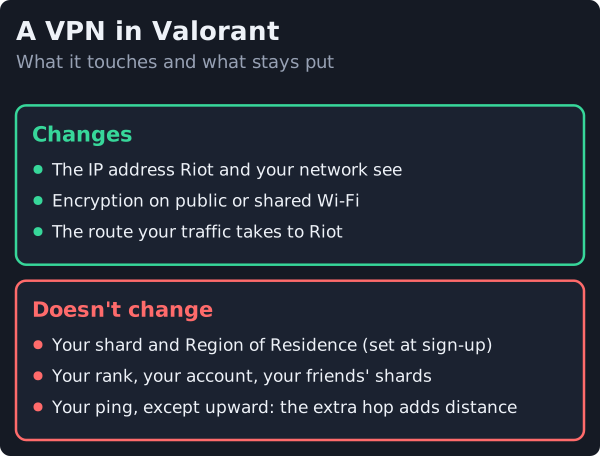
You can play Valorant with a VPN, and Riot's Terms of Service contain no clause that bans VPN use. But a VPN won't do what most people install one for. It can't move your account to another region, because Riot ties your shard to where you physically lived when you created the account, and it usually adds ping rather than cutting it. Riot's own support site says to "be extra careful when playing from a VPN".
Where a VPN genuinely helps is the same as in other games: encrypting your connection on public Wi-Fi, keeping your activity from your internet provider, and, rarely, working around a provider that slows gaming traffic. Everything below quotes Riot's own pages, read on 18 October 2026: its Terms of Service, last modified on 1 December 2024, and two Valorant support articles on regions and account transfers.
Will a VPN get you banned in Valorant?
Not for using one, as far as Riot's published rules go. We read the full Terms of Service and found no mention of VPNs, proxies or playing from another region. The nearest rule is in section 7.1, which prohibits getting around the technical measures Riot or its partners use to protect or control access to its services. Riot reserves the right to take disciplinary action, including bans, under that section.
So the risk depends on what the VPN is doing. A VPN pointed at a server inside your own country, used for privacy, isn't circumventing anything. A VPN used to get into a region your account isn't allowed to play in is a different matter, and that's the case Riot's warning points at. We also looked for a Riot statement on whether its anti-cheat, Vanguard, reacts to VPNs and found none either way, so we won't guess. Our game-by-game guide to VPN bans sets Riot's wording beside Steam, Roblox and others.
Your shard is locked to where you live
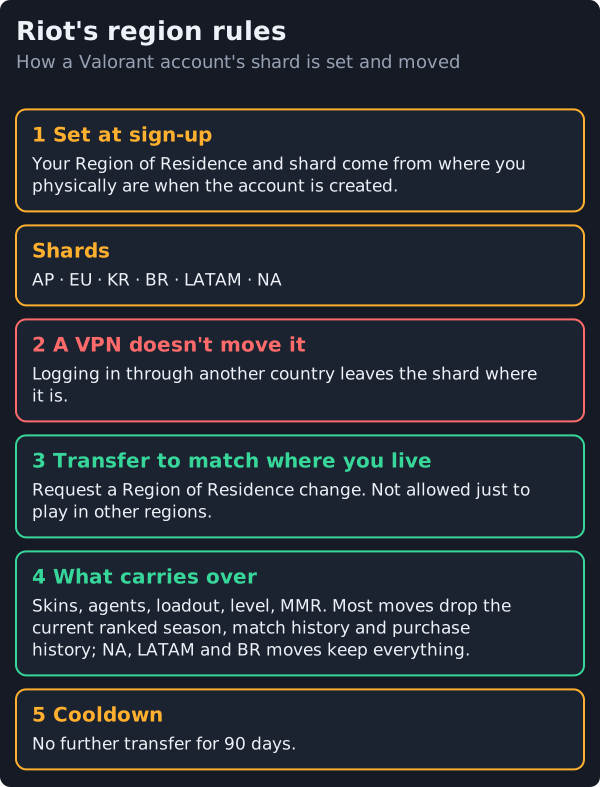
This is the part most VPN guides skip. Riot's Account Transfer FAQ explains that every account has a Region of Residence and a shard. The shard decides who you can play with and which servers you can choose from, and both are set by your physical location when you created the account. Valorant's shards are Asia-Pacific, Europe, Korea, Brazil, Latin America and North America.
Connecting through a VPN doesn't change an existing account's shard. Riot changes it only through a transfer request, and only to match where you actually live: "Shard changes are only done to match your RoR. You cannot change shards just to play in other regions." Riot's Region of Residence page adds that your region also decides your payment options and who you can queue with.
If you have actually moved country, use Riot's region-change page rather than a VPN. The FAQ lists what a transfer costs you. Your skins, agents, loadout, account level and MMR come with you, but in most transfers your current ranked season, match history and purchase history don't. Moves between the North America, Latin America and Brazil shards keep everything. After any transfer there's a 90-day wait before you can move again.
Why a VPN usually raises your ping
A VPN sends your traffic to the VPN server first and on to Riot's servers from there. That extra hop adds distance, and encrypting the traffic adds a little processing time, so for most players ping goes up. It can only fall if your internet provider routes you to Riot's servers badly and the VPN's path happens to be better, which is uncommon and worth testing before you rely on it. Our explainer on whether a VPN reduces ping walks through the mechanics.
DDoS protection, a common selling point, matters little here. Valorant runs on Riot's own servers, so other players don't see your IP address the way they can in some peer-to-peer games. To get the best route without a VPN, Riot's support site suggests selecting the server closest to you within your shard. Our guide to why games lag, and what fixes it covers the other causes worth ruling out first.
When a VPN is worth it for Valorant
There are three situations where we'd use one.
- Public or shared Wi-Fi. In a hotel, dorm or café, a VPN encrypts your whole connection, including your Riot login and anything else running on the laptop. See our public Wi-Fi gaming guide.
- Privacy from your internet provider. A VPN hides which services you connect to from your provider, though Riot still sees your account and the VPN's IP address.
- Proven throttling. If your provider slows gaming traffic at peak times, a VPN can stop it identifying that traffic. This is rarer than people think; test for ISP throttling before paying for a fix.
In all three cases, keep the VPN server in the country you're actually in. That avoids any question of region circumvention and keeps the extra distance as small as possible.
Making an account through a VPN: the trap
Some guides suggest creating a Valorant account while connected to a VPN in another region, so the account lands on that region's shard. Riot's FAQ is the reason we don't. An account made that way is tied to a region you don't live in, and Riot's transfers only move accounts to match a player's physical location, so you can't later fix it through support. You'd also be playing every match far from home, with the ping that brings. If you want to play with friends abroad, Riot's rule is plain: you can only play with friends on the same shard.
Free VPNs and Valorant
Free VPN plans are a poor fit for competitive play. Proton VPN's free plan, for instance, picks your server at random from 10 countries and runs at what Proton calls medium speed, so you can't pick the nearby server that keeps ping down. Windscribe's free plan lists its 10 countries but limits you to 10 GB of data monthly, and only that much once you've confirmed an email. Either is fine for securing a café connection now and then; neither is built for ranked matches. If you do use a free VPN, prefer one funded by its paid plans rather than by advertising.
How to set up a VPN for Valorant
- Choose a reputable paid VPN with WireGuard or a similar fast protocol, a kill switch and split tunnelling.
- Pick a server inside the country you're in, as close to you as the provider offers.
- Use split tunnelling to decide whether Valorant goes through the VPN. For pure privacy on home internet, leaving the game outside the tunnel keeps ping unchanged; on public Wi-Fi, route everything through it. Our split tunnelling guide shows how.
- Play a few unrated matches with and without the VPN and compare your ping before using it in ranked.
Edge cases
- Korea, Japan and China. Riot doesn't move accounts from the South Korea region to Japan, and players who want a Korean region need a new Korean account. Region changes to China aren't available at all.
- Vietnam. Riot only sets Vietnam as your region if you're a permanent resident there.
- Travelling. Your account stays on its home shard while you're abroad, so expect higher ping from far away; a VPN doesn't fix distance.
- Other Riot games. Riot warns that its region-change tool may reset your 2XKO account and its progress, so contact support first if you play it.
- School or workplace networks. Using a VPN to get around a block on Valorant breaks that network's rules even if it doesn't break Riot's.
The bottom line
Use a VPN with Valorant for privacy and public Wi-Fi, on a server in your own country, and you're inside Riot's published rules. Don't use one to change regions: your shard won't move, and an account created through a foreign server gets stuck where you don't live. If you've decided you want one, our best gaming VPN picks rank providers on the features that matter for play, not on ping claims.
VPN for Valorant: FAQ
Is using a VPN in Valorant bannable?
Can a VPN change my Valorant region?
Does a VPN lower ping in Valorant?
Is there a good free VPN for Valorant?
How do I play Valorant with friends in another region?
Zoom back out: the best VPNs for gaming, ranked honestly, or the plain answer on whether a VPN reduces ping.