Gaming VPN vs GPN (ExitLag, NoPing): What a Gaming Tunnel Does
Is ExitLag a VPN? No, and its maker says so: ExitLag calls itself a game connection optimizer that sends game traffic over several routes at once, while a VPN encrypts your traffic and sends it through one server you pick. NoPing draws the same line. Tools like these, often called GPNs (gamers' private networks) or gaming tunnels, can help when your internet provider's route to a game server is the weak link. Neither type fixes distance, an overloaded game server or bad Wi-Fi, and those cause most of the lag people try to buy their way out of.
This page is for players weighing a routing optimiser against a VPN, or wondering why a "no lag VPN" left their ping where it was. If your ping is high but steady, skip both for now and start at the section on distance. Neither ExitLag nor NoPing pays us anything; we name them because the search results for this topic are otherwise written by the vendors themselves.
The short answer
A VPN wraps your traffic in an encrypted tunnel to one server, then lets that server talk to the game under its own address. A GPN routes game traffic only, through relay servers it chooses, and the two we looked at both say they use several paths at the same time. A VPN exists for privacy and for appearing somewhere else; a GPN exists for the route. When your ISP's path is the problem, a GPN is designed for it, and a VPN only helps if its own network happens to reach the game more cleanly. When the path is already fine, both add a hop and neither has anything to fix.
| VPN | GPN (ExitLag, NoPing) | |
|---|---|---|
| What goes through it | All device traffic by default; split tunnelling can narrow it | Game traffic only, per both vendors |
| Paths to the game | One tunnel to one server, then one exit | Several at once, per both vendors (ExitLag calls it Multipath) |
| Encryption | Yes; it's the core feature | ExitLag says it "does not encrypt all your traffic"; NoPing says it's "not a VPN" |
| Extra internet lines | No | Both advertise combining more than one connection |
| Platforms | Most operating systems; consoles only via a router or shared PC | ExitLag: Windows, Android, iOS; NoPing: PC, Android, iOS |
| Best at | Privacy on untrusted networks, hiding your IP | Routing around a lossy or congested ISP path |
What a VPN does to game traffic
With a VPN on, your device encrypts each packet and sends it to the VPN server. The server decrypts it and forwards it to the game server from its own IP address, and replies come back the same way. Encryption costs a little processing time, but the bigger cost is geography: the packet now travels to the VPN server and on to the game, instead of straight to the game. Pick a server close to the game's data centre and the detour can be small. Pick one far away and every packet pays for it, as covered in does a VPN reduce ping.
When a VPN does lower ping, it's a side effect. The provider's network may reach the game's data centre over a cleaner path than your ISP uses, so the longer-looking route ends up faster. You can't see or steer that path inside a VPN app; you can only try servers and measure. That blind spot is the gap GPN vendors say they fill.
What a GPN does (routing, multipath, no full-tunnel encryption)
ExitLag's own blog, dated 31 July 2026, says ExitLag "is not a VPN" but "a game connection optimizer built specifically to analyze multiple network paths in real time and select the fastest, most stable route to your game's servers." It adds that ExitLag "does not encrypt all your traffic" and that its Multipath feature "sends your connection through several routes simultaneously", so that if one path degrades the others keep the match going. It also advertises a Multi-Internet option that uses more than one internet connection at once.
NoPing's site answers the same question with "No, it's not a VPN", and describes AI that picks several parallel routes to the game server, plus a feature that combines more than one internet provider. Both vendors publish headline ping-reduction claims. We haven't tested them and don't repeat them here; your own measurements during a trial are the only numbers worth planning around.
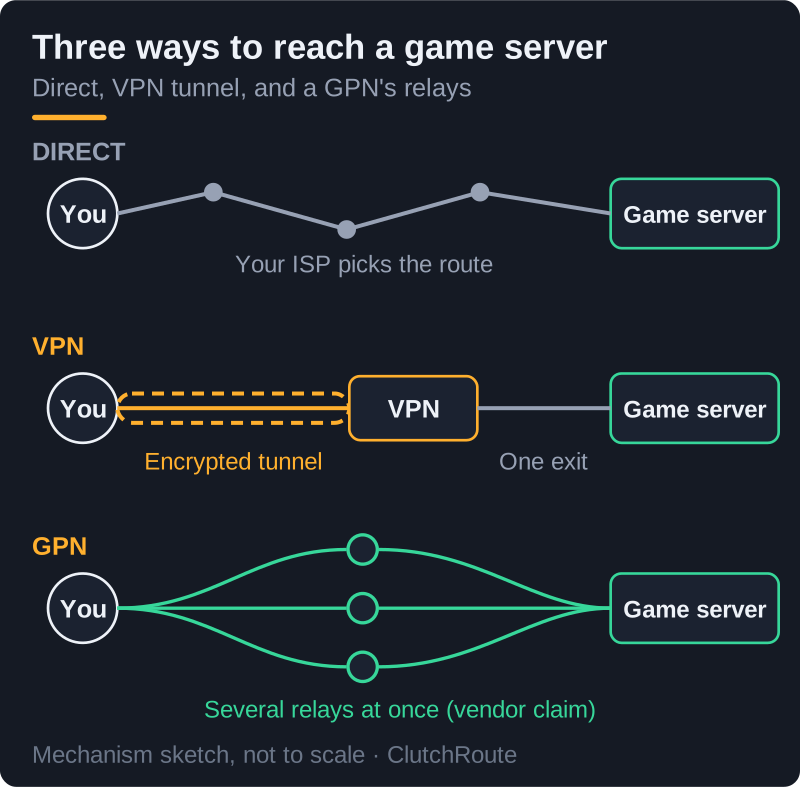
Strip out the marketing and the mechanism is plausible. Spreading game packets over several relays means one lossy link doesn't stall the match, and choosing the relay path in real time can dodge a congested hop your ISP would otherwise use every evening. What multipath can't do is beat physics. Every relay path still has to cover the distance to the game server, and if that server is struggling, no route reaches a faster copy of it.
When either helps: bad ISP routes
The situation both tools are built for has a recognisable signature: ping that's fine most of the day but spikes or drops packets in the evening, or one game that plays badly while others from the same connection feel normal. Both patterns point to congestion or poor peering somewhere between your ISP and the game, outside your house and outside the game company's servers. That middle stretch is the only part of the journey either tool can change.
Measure before paying for anything. Open the game's network graph, or run a continuous ping to its server region for a few minutes with nothing else using the connection, and note jitter and packet loss. Repeat during the bad hours. If loss shows up only at certain times or only toward certain games, a routing tool has something to work with. Both vendors link to free trials on their sites; check the current terms, and run any trial during your worst hours, because that's the only test that counts.
If you'd rather try a VPN against the same problem, choose a WireGuard-based one and test servers near the game's data centre, not near you. NordVPN offers NordLynx, its WireGuard-based protocol, and first purchases come with a 30-day money-back window (renewals can't be refunded), enough to test across several bad evenings. Mind the second year: NordVPN's US renewal table showed Basic renewing at $139.08 a year when we read it on 9 Oct 2026. Check NordVPN's current offer (affiliate link).
When neither helps: distance and server tick
High but steady ping is usually distance. Signals in fibre take real time to cross a continent, and no routing trick shortens the cable to a server on the other side of an ocean. A GPN may find a straighter path than your ISP's, but a straight path still has a floor, and if your ISP's route is already direct there's nothing left to straighten.
Some lag isn't on your side at all. Online games simulate the match on the server at a fixed tick rate, and when a server is overloaded or the netcode struggles, everyone in the lobby sees rubber-banding and late hit registration whatever route they're on. Software on your PC can't make the game's server compute faster.
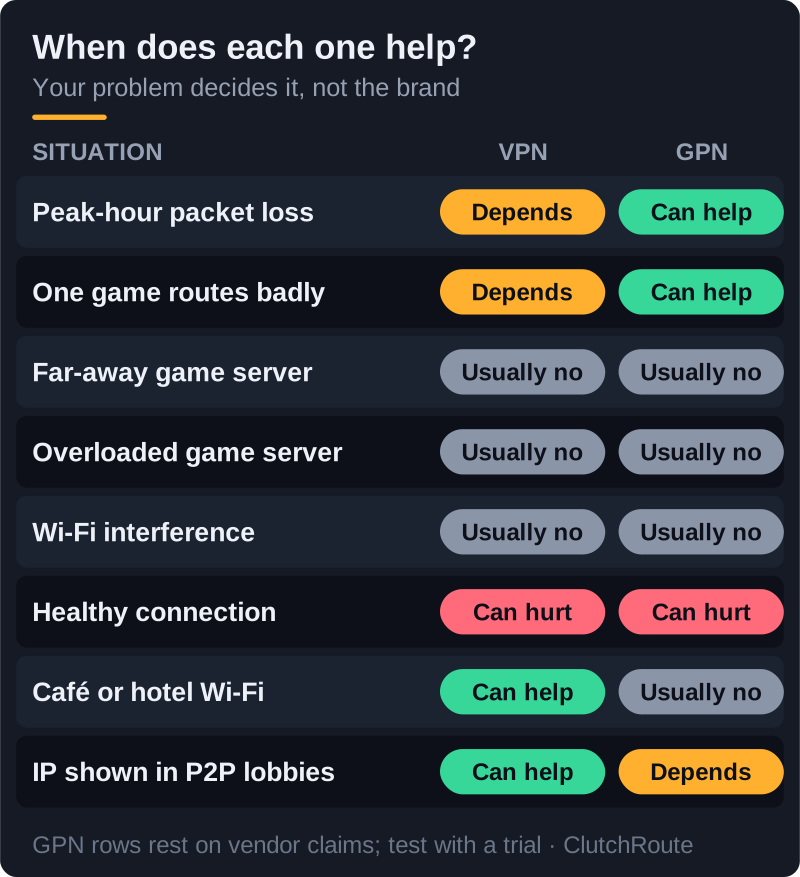
The third case starts at home: Wi-Fi interference, a backup or stream saturating your upload, or a tired router. These cause jitter and loss before your packets even reach the ISP, so both a VPN and a GPN sit downstream of the problem. A cable and a paused download fix more lag than either subscription. Our guide to whether a VPN reduces lag shows how to tell these causes apart.
Ban risk for each
Neither ExitLag nor NoPing is named in any of the publisher terms we read on 9 October 2026, and none of those documents mentions routing optimisers at all. The rules attach to behaviour. Valve's Steam Subscriber Agreement bars "IP proxying or other methods to disguise the place of your residence", and Roblox's Community Standards ban using VPNs to mask your location for unauthorized access. A GPN relaying your game traffic through a server in your own region doesn't change where you appear to live. One used to reach another country's servers or a blocked region can.
That's worth knowing because NoPing markets exactly that use: its site says the service can "bypass firewalls, regional blocks and IP restrictions to play on international servers". Doing that with any tool, VPN or GPN, is where the terms bite. Activision's enforcement policy also lists spoofing, defined as any attempt to hide, disguise or obfuscate your identity, without saying either way how it treats VPNs or optimisers. Our VPN ban guide quotes each publisher's clause in full.
Is NoLagVPN the same thing?
"No lag VPN" is mostly a generic search, but NoLagVPN is also a separate brand, and not one we recommend. Its own site (nolagvpn.com, read 9 Oct 2026) sells it as "The #1 Warzone VPN for getting into bot lobbies", explaining that connecting through far-away locations makes it harder for the game to find matches, so skill-based matchmaking loosens. That is matchmaking manipulation by design. NoLagVPN also claims a VPN cannot get you banned or shadow-banned; Activision's published penalties include Limited Matchmaking, Ranked Play restrictions and temporary or permanent bans, and its policy grants no exemption for VPNs.
Which one to pick
- Trial a GPN if your ping is fine most of the time but you lose packets or spike on one game or at peak hours, and the game's connection is all you care about.
- Use a VPN if you want privacy on public or shared networks, your home IP hidden from other players in peer-hosted games, or protection for everything on the device, and you accept it may add a few milliseconds.
- Use neither if your ping is high but steady, the lag shows up in every game, or you're playing over Wi-Fi. Fix the home network and your expectations about distance first.
Don't run both at once. ExitLag's own blog warns that stacking two routing tools often creates conflicts and unpredictable results, and the reason is simple: each one assumes it controls the path. If you need a VPN for privacy and a GPN for one game, exclude the game from the VPN with split tunnelling so only one tool handles its traffic.
Edge cases
Consoles. Neither GPN listed a console app on the pages we read; ExitLag's navigation offers a Windows desktop app and Android and iOS mobile apps. A VPN reaches a PlayStation or Xbox only through a router or a shared PC connection, which our console gaming guide covers.
Mac players. ExitLag lists its desktop app for Windows only. A VPN is the easier option on a Mac, with the same distance caveats as anywhere else.
Cloud gaming. Streamed games are the most latency-sensitive case, because every extra hop adds delay to your inputs as well as to the picture. Unless the route to the streaming data centre is genuinely broken, leave both tools off.
Mobile data. On cellular, your path shifts as you move between cells and the carrier's network gets busy. A routing tool might smooth some of that, but results vary by carrier and area, so the free trial matters more here than anywhere.
The bottom line
A gaming tunnel and a VPN solve different problems. A GPN reroutes game traffic around a bad ISP path and doesn't try to be a privacy tool; a VPN protects and relocates all your traffic and only sometimes improves the route. If your lag comes from distance, the game's server or your own Wi-Fi, neither helps, and testing for an evening will show you that before you've paid for a year. If a VPN does fit your case, our best VPN for gaming guide compares the options.
Gaming VPN vs GPN — FAQ
Is ExitLag a VPN?
Does ExitLag actually lower ping?
What is a gaming tunnel?
Is a no lag VPN real?
Can ExitLag or NoPing get you banned?
Zoom back out: the best VPNs for gaming, ranked honestly, or the plain answer on whether a VPN reduces ping.